Best Cat Feeder With Camera: 4 Smart WiFi Picks (2026)
We compared the current field of WiFi smart feeders and picked the 4 best camera-equipped options for watching and feeding your cat or dog remotely, plus the 2.4GHz WiFi check, privacy basics, and vet-informed monitoring tips no other roundup covers.

This article contains affiliate links. Webvet may earn a commission when you buy through them, at no extra cost to you.
WebVet may earn a commission from qualifying purchases made through links on this page, at no additional cost to you.
A cat feeder with camera solves two problems at once: your pet gets fed on schedule, and you get to watch it happen. Instead of wondering whether the kibble actually dropped, or whether your cat actually showed up to eat, you open an app and see for yourself.
We compared the current field of camera-equipped WiFi smart feeders and narrowed it to four picks that cover most households: a best-overall 5-liter unit, a compact feeder with the strongest owner ratings, a dual-bowl option built for two cats, and a budget WiFi feeder for owners who can skip the camera.
The Petlibro Granary WiFi Camera Feeder is our top pick for most cat owners: a 5-liter hopper, 1080p video with night vision, and app-based meal scheduling in one unit. Budget buyers who do not need video can save more than half with the PATPET 2.4G WiFi feeder.
This roundup is built around remote monitoring and feeding: long workdays, weekends away, and short vacations. Every recommendation is a WiFi feeder you control from your phone, and three of the four include a built-in camera so you can check on your pet from anywhere.
Here is everything this guide covers:
- Our four picks, each matched to a specific owner situation
- A comparison table of camera, app, WiFi band, capacity, and price
- The 2.4GHz WiFi compatibility check to run before you buy
- Camera privacy basics, including a pre-purchase privacy checklist
- Vet-informed ways to use the camera to catch appetite changes and separation anxiety early
The 4 Best Pet Feeders With Cameras in 2026

The best automatic cat feeder with a camera for most owners is the Petlibro Granary WiFi Camera Feeder. It is our top pick because it pairs the largest hopper in this roundup (5 liters) with 1080p video and night vision, so a single unit covers both scheduled feeding and around-the-clock remote monitoring.

Four criteria decide a camera feeder purchase: video quality (1080p video with night vision is the current baseline), feeding reliability, app quality, and WiFi compatibility. The Petlibro Granary leads on capacity, the PETKIT YumShare Solo carries the strongest Chewy rating at 4.5 stars, and the FrienHund is the rare unit built for two cats.
We evaluated the field the way a careful buyer would:
- Verified specs against current Chewy listings, and flagged anything a manufacturer does not publish rather than guessing.
- Weighted owner ratings as the best available signal of long-term feeding reliability.
- Prioritized monitoring usefulness: camera placement, night vision, and clip history over gimmicks like treat-tossing.
- Checked the boring stuff that generates returns: WiFi band requirements, app account sharing, and hopper access for cleaning.
Which Feeder Fits Which Owner?
Skip the generic ranked list and start with your actual situation:
- One cat, want the full package: Petlibro Granary. Big hopper, solid camera, mature app.
- Small space, best rating for the money: PETKIT YumShare Solo. Compact 3L body, 4.5-star Chewy rating.
- Two cats who share (or steal) meals: FrienHund Two-Cat. A splitter sends each portion to two separate bowls.
- Budget under $60, camera optional: PATPET 2.4G WiFi feeder. Reliable app scheduling, no camera, pair it with a cheap standalone cam if you want eyes later.
The comparison table below puts the key specs side by side. Prices are current Chewy listings and can change, and where a manufacturer does not publish a spec we say so rather than guess.
| Feeder | Camera | App | WiFi band | Capacity | Price |
|---|---|---|---|---|---|
| Petlibro Granary WiFi Camera Feeder | 1080p with night vision | PETLIBRO app | 2.4GHz only | 5 L | $129.99 |
| PETKIT YumShare Solo Camera Feeder | 1080p with night vision | PETKIT app | 2.4GHz only | 3 L | $94.48 |
| FrienHund Two-Cat 1080P Camera Feeder | 1080p (night vision: confirm on listing) | FrienHund companion app | 2.4GHz (typical for this class; confirm on listing) | Dual-bowl; hopper size on listing | $99.99 |
| PATPET 2.4G WiFi Feeder | No camera | PATPET app | 2.4GHz only | 3 L | $53.99 |
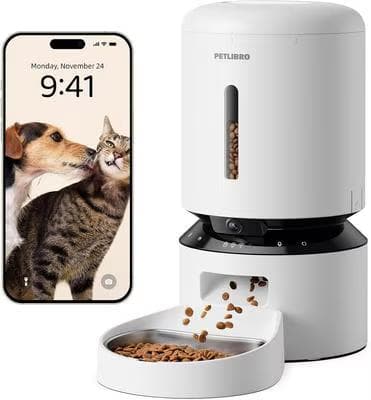
1. Petlibro Granary WiFi Camera Feeder 5-L: Best Overall
Webvet may earn a commission when you click through to Chewy, at no extra cost to you.

The Granary line is Petlibro's workhorse automatic feeder, and the camera version bolts a 1080p lens directly above the food chute. That placement matters: the camera looks down at the bowl, so every feeding session is captured whether or not you are watching live.
The 5-liter hopper is the practical headline. For a single average adult cat on dry food, that is roughly two to three weeks of meals between refills, which turns a weekend trip into a non-event. The sealed lid and desiccant compartment help keep kibble fresh between top-ups.
In the PETLIBRO app you schedule up to multiple meals per day, adjust portion sizes in small increments, and review clips of feeding activity. Night vision means the 3 a.m. snack raid is on the record too, which is genuinely useful if you are tracking how much your cat eats.
What to weigh before buying:
- Strengths: biggest hopper here, 1080p video with night vision, portion scheduling, feeding-activity clips, mature app.
- Trade-offs: the largest footprint of the group, 2.4GHz-only WiFi, and a 4.2-star Chewy rating that trails the PETKIT, with most complaints centering on WiFi setup rather than feeding reliability.
- Best for: single-cat and single-dog homes that want one unit to do everything.
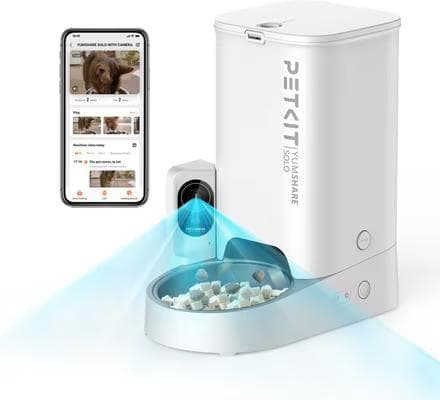
2. PETKIT YumShare Solo Camera Feeder 3L: Best Rated
Webvet may earn a commission when you click through to Chewy, at no extra cost to you.

The PETKIT YumShare Solo is the pick our research kept circling back to for owner satisfaction: a 4.5-star Chewy rating, the best of any camera feeder in this roundup. PETKIT has been building app-connected pet hardware for years, and it shows in the polish of the experience.
The camera records in 1080p and PETKIT lists night vision, so overnight eating habits are visible. The lens is positioned to capture your pet's face and body at the bowl rather than just the top of a head, which makes the footage more useful for spotting changes in posture or hesitation at mealtime.
The 3-liter hopper is smaller than the Granary's, but for one cat that is still well over a week of dry food. The compact body is the right shape for apartments and small kitchens where a 5-liter tower would dominate a corner.
What to weigh before buying:
- Strengths: best owner rating of the group (4.5 stars), strong camera placement, compact footprint, polished app.
- Trade-offs: smaller 3L hopper means more frequent refills in multi-pet or large-dog homes, and it is 2.4GHz-only like the rest.
- Best for: single-cat apartments and anyone who prioritizes app quality and reliability over raw capacity.
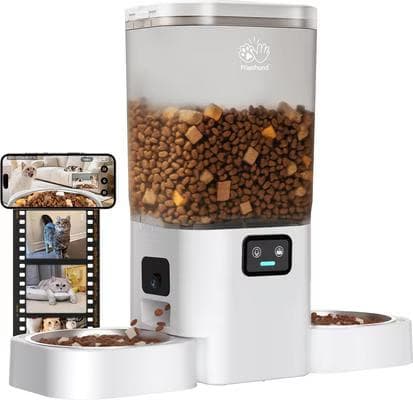
3. FrienHund Two-Cat 1080P Camera Feeder: Best for Two Cats
Webvet may earn a commission when you click through to Chewy, at no extra cost to you.

Most automatic feeders quietly assume you have one pet. The FrienHund is built for the far more common reality of two cats: a splitter divides each dispensed portion between two separate bowls, so both cats eat at the same time without shoving each other off a single dish.
That design does not stop a determined food thief; a dominant cat can still finish its bowl and shoulder into the other one. But separate bowls spaced apart reduce mealtime competition compared with one shared trough.
The 1080P camera then does the part no divider can: it shows you who is actually eating what. In a two-cat home, that is exactly the information a single-bowl feeder can never give you, and it is how you catch one cat quietly ceding meals to the other.
What to weigh before buying:
- Strengths: the only dual-bowl camera feeder in the group, simultaneous portions for two cats, 1080p video, mid-range price.
- Trade-offs: no rating history yet, a smaller brand behind the app, and specs you should verify on the listing rather than assume.
- Best for: two-cat households where mealtime competition or food stealing is the daily problem.
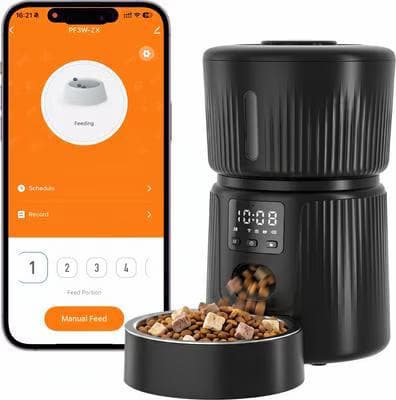
4. PATPET 2.4G WiFi Feeder 3-L: Best Budget (No Camera)
Webvet may earn a commission when you click through to Chewy, at no extra cost to you.

Be clear on what this one is: the PATPET has no camera. It earns its spot as the budget WiFi alternative for owners who want app-scheduled remote feeding at $53.99 and either do not need video or already own a pet camera pointed at the feeding area.
What you keep is the core smart-feeder experience: a 3-liter hopper, app-based meal schedules over 2.4GHz WiFi, and remote portion dispensing when plans change. What you give up is everything visual: live check-ins, feeding clips, and eyes-on confirmation that your cat showed up and ate.
At a 4.4-star Chewy rating, owners rate it nearly as highly as the PETKIT, which says a lot about how much of a smart feeder's value is reliable dispensing rather than the camera.
If monitoring matters to you, though, spend up for one of the three camera picks above. A feeder you cannot see is a feeder you are trusting blind, and the whole premise of this roundup is that seeing is the point.
What to weigh before buying:
- Strengths: lowest price by a wide margin, 4.4-star rating, app scheduling and remote feeds, compact 3L body.
- Trade-offs: no camera means no visual confirmation, no feeding clips, and no monitoring value while you travel.
- Best for: budget buyers, second feeders for a multi-room setup, or homes that already run a separate pet camera.
WiFi, App, and Camera Features to Check Before You Buy
Camera feeders fail buyers in predictable ways, and almost none of them involve the feeding mechanism. The three friction points are WiFi compatibility at setup, app quality over time, and camera specs that sound equivalent on paper but perform very differently at 3 a.m. in a dark kitchen.

The 2.4GHz WiFi Check (Do This Before You Order)
Here is the single most common reason smart feeders get returned: every feeder in this roundup, like most smart pet devices, connects only on 2.4GHz WiFi.
If your phone is on a 5GHz network during setup, or your router merges both bands under one network name, pairing can fail in ways the in-app error messages never explain. Owners blame the feeder, leave a one-star review, and return a working unit.

Why do manufacturers still ship 2.4GHz-only devices? Range and cost. The 2.4GHz band travels farther and through more walls than 5GHz, which suits a feeder parked in a kitchen corner far from the router, and the radios are cheaper. A feeder streams low-bitrate video, so it does not need 5GHz speed anyway.
Not sure which band your network uses? Open your WiFi settings and look at the network names: separate names ending in something like "-2.4G" and "-5G" mean you are fine. A single name on a mesh system (Eero, Google WiFi, Deco) usually means combined bands, so plan on one of the fixes below.

Three quick fixes if your network is 5GHz-first:
- Split the bands. Most router and mesh apps let you broadcast the 2.4GHz band under its own name, even temporarily just for setup.
- Use a 2.4GHz guest network. A dedicated IoT guest network also isolates the feeder from your main devices, which is a privacy win.
- Check band steering. Some mesh systems reassign devices automatically; pinning the feeder to 2.4GHz stops it from dropping offline.
Camera Specs That Actually Matter
Resolution is table stakes: 1080p is the baseline all three camera picks meet, and it is enough to see whether food is in the bowl and whether your cat is eating normally. The specs that separate a useful camera from a checkbox feature are night vision, field of view, and lens placement.
Night vision matters more on a feeder than on a general pet camera because cats are crepuscular: much of their natural eating happens in low light, at dawn, dusk, and overnight. A feeder camera without infrared misses exactly the meals you most want to verify while you are asleep or away.
Field of view determines whether you see a cat or a forehead. A wide-angle lens mounted above the chute, like the one on the Petlibro Granary, captures the bowl plus the approach area, so you can watch body language, not just confirm kibble dropped.
Two-way audio appears on some models and manufacturers market it heavily. Treat it as a bonus, not a buying criterion: many cats ignore or actively dislike disembodied voices, and none of the core monitoring value depends on it.
App Features Worth Paying For
The feeder is hardware you set up once; the app is the product you actually live with every day. A clunky app turns a good feeder into a gadget you stop checking, and an abandoned app means the camera half of your purchase quietly stops earning its price.
Prioritize these when comparing apps:
- Flexible scheduling: multiple meals per day with per-meal portion sizes, not one fixed daily drop.
- Manual remote feed: a tap-to-dispense button for schedule changes and delayed flights.
- Feeding logs and clips: a history of when food dispensed and video of who ate it.
- Low-food and jam alerts: the feeder should tell you about a problem before your cat does.
- Shared access: a second household member or pet sitter should be able to use the app without your login.
Camera Privacy and Data Security Basics
A camera feeder is an internet-connected camera inside your home, and it deserves the same scrutiny you would give any security cam. Video from these devices typically routes through the manufacturer's cloud servers to reach your phone, which means your kitchen footage is only as private as that company's practices.
Run this privacy checklist before and right after purchase:
- Create a unique password for the feeder app; never reuse your email or bank password.
- Enable two-factor authentication if the app offers it.
- Check where video is stored (cloud, local SD card, or both) and how long clips are retained.
- Update firmware as soon as the app prompts; camera exploits are patched through these updates.
- Aim the lens deliberately. Point it at the feeding area, not across the room at living space.
- Isolate it on a guest network so a compromised feeder cannot see your laptops and phones.
None of this should scare you off; the same checklist applies to every smart camera, doorbell, and baby monitor. It simply means the cheapest no-name camera feeder on a marketplace is not automatically a bargain, because you are trusting the vendor with a live feed of your home.
This is one quiet argument for the established brands in this roundup. Petlibro and PETKIT maintain their apps, publish updates, and have reputations to lose; a disposable marketplace brand that disappears next year takes its security patches with it, leaving a camera in your kitchen that nobody maintains.
What Makes a Smart Pet Feeder Worth It?
Strip away the novelty and a smart pet feeder earns its price in three ways: consistency your schedule cannot provide, portion control your scoop cannot match, and information your absence otherwise erases. If none of those three apply to your household, a $15 gravity feeder genuinely is the better buy.
Consistency is the underrated one. Cats are creatures of routine, and irregular mealtimes are a common source of dawn yowling, counter-surfing, and stress behaviors. A feeder that dispenses at 6:30 a.m. every day, whether you are asleep, at the gym, or stuck at work, removes you as the bottleneck.
Dog owners get the same benefit. Our guide to building a dog feeding schedule explains why timing consistency matters for digestion and behavior, and a smart feeder is the easiest way to actually execute the schedule you settle on.
The best smart pet feeder for your home is not necessarily the most connected one. A smart automatic pet feeder earns the word smart when its app tells you something you would act on: a skipped meal, a low hopper, a portion trend.
Dashboards you never open are just battery drain. Decide which alerts you would genuinely check from work, whether that is meal confirmations, low-food warnings, or video clips, then pick the model whose app leads with those instead of burying them three menus deep.
A smart feeder is worth it when at least one of these is true: your schedule is irregular, your pet needs measured portions for weight management, or you travel enough that visual confirmation of eating has real value. The camera adds a fourth reason: it turns feeding time into a daily health check you can review from anywhere.
Portion control is the health case. Free-feeding from a topped-up bowl makes it nearly impossible to know how much a pet eats, and gradual overfeeding is how indoor cats drift toward obesity. A feeder that dispenses measured portions turns "about a scoop" into an exact daily number you and your vet can adjust.
The monitoring case is what separates the smart pet feeder category from a plug-in timer. Every app in this roundup logs when food dispensed; the camera models also show you whether it was eaten, immediately or reluctantly, by the right pet or the wrong one.
That record is worth almost nothing on an ordinary Tuesday. It is worth a great deal the week your cat starts leaving food behind, because you will have days of baseline footage to compare against instead of a vague sense that something is off.
Price the habit, not the gadget. A feeder you check daily for the first week and never again has earned nothing; the value compounds only if the log becomes part of how you notice your pet's health. Owners who already track weight or litter habits get the most from the category.
When is a smart feeder not worth it? Be honest about these cases:
- Wet-food households. The feeders in this roundup dispense dry kibble only; refrigerated wet-food feeders are a different, smaller category.
- Medication-dependent feeding. If pills must be eaten with food under supervision, automation can hide a skipped dose.
- Chronic WiFi dead zones. A smart feeder in a room with no signal is an expensive gravity feeder.
- Pets who outsmart hardware. A determined paw can defeat cheaper hoppers; check lid-lock design if your cat is a known burglar.
Camera Feeders vs. Standard Automatic Feeders
A camera feeder is a superset of a standard automatic feeder: everything a timer-based unit does, plus eyes. Whether the roughly $40-80 premium is worth it depends entirely on how much you value confirmation over assumption while you are away.
Notice what the price gap actually buys in this roundup: the camera-free PATPET costs $53.99 while the camera picks run $94.48 to $129.99. You are paying for the lens, the night vision, and the clip storage, not for better feeding mechanics, which is why the PATPET's owner rating keeps pace with the camera models.
| Camera feeder | Standard automatic feeder | |
|---|---|---|
| Scheduled meals | Yes | Yes |
| Remote manual feeding | Yes, via app | App models yes; dial-timer models no |
| Visual confirmation pet ate | Yes, live and recorded | No |
| Appetite-change early warning | Yes, via clips and logs | Dispense logs only on app models |
| Typical price range | $90-160 | $30-90 |
| WiFi required | Yes, 2.4GHz | Only for app-connected models |
| Privacy considerations | Yes, it is a home camera | None |
If you are choosing for a cat and the camera is optional, start from the full field: our pillar guide to the best automatic cat feeders covers the whole category, including non-camera and multi-cat options, and treats camera models as one branch of a bigger decision.
Dog owners have their own version of that decision. Camera feeders work for small and medium dogs, but large breeds need bigger hoppers and portions than most camera models offer; our guide to the best automatic dog feeders covers the capacity math and the dog-specific picks.
The rule of thumb we would give a friend: buy a standard feeder for schedule convenience when you are mostly home, and buy the camera version when you are regularly away at mealtimes. The camera's value scales with your absence.
Are Camera Feeders Safe and Vet-Approved?
The veterinary consensus on feeding management, reflected in the Cornell Feline Health Center's feeding guidance, favors consistent schedules and measured portions over free-feeding, and an automatic feeder is simply a machine that executes both. Used correctly, these devices support the feeding practices vets already recommend.
The camera arguably makes these the most vet-friendly feeders in the category, because the biggest professional reservation about automation is lost observation. A timer feeder hides your pet's eating behavior from you; a camera feeder records it. You automate the labor of feeding without automating away the information.
That said, the honest caveats are real:
- Mechanical failure is possible. Hoppers can jam and WiFi can drop, which is why alerts and a camera check matter, and why a feeder should never be the only plan for a multi-day absence.
- Dry food only. These models cannot handle wet food, which some cats need for urinary and hydration reasons.
- Multi-pet homes need thought. Without microchip-gated access, a feeder cannot stop the wrong pet from eating a portion.
- Automation is not supervision. A feeder feeds; it does not notice vomiting, limping, or a litter box problem.
A practical middle path: mention the feeder at your cat's next checkup. Your vet can translate the label's feeding guideline into an exact daily portion for your cat's weight and body condition, and that number is what you program into the app. The feeder then enforces the plan your vet actually wrote.
We cover the full vet perspective, including whether vets actually recommend these devices and the disadvantages that deserve the most weight, in our dedicated explainer on whether automatic feeders are good for cats. If you are on the fence about the whole category rather than choosing between camera models, start there.
Feeding and Monitoring Your Cat on Vacation

This is the use case that sells most camera feeders, so let's answer it directly. How do you feed cats when on vacation? For a short trip, a layered plan works better than any single device:

- Schedule the feeder for your cat's normal mealtimes; do not change the routine and the trip at once.
- Run a trial week at home first so setup problems surface while you can fix them.
- Leave abundant water: at least two large bowls or a fountain, in separate rooms.
- Check the camera at each mealtime to confirm your cat showed up and ate.
- Arrange a human backup: a neighbor or sitter with a key, even if their only job is day two.
- Scoop-proof the setup: put the feeder on a stable surface a determined cat cannot tip.
Water deserves as much planning as food. The feeders here handle kibble, but nothing in this category automates hydration, and dry-food diets make water intake matter more, not less.
A pet fountain plus at least one backup bowl in a separate room covers the tipped-bowl accident your feeder camera will never show you, because it happened two rooms away. If your camera's field of view can include a water bowl, position it that way; one lens watching both resources doubles its usefulness.
Run one failure-mode rehearsal before any trip. Unplug the feeder for a minute to see what the schedule does when power returns, turn off the WiFi to check whether scheduled feeding continues offline, and confirm the app alerts you instead of failing silently.
A ten-minute rehearsal at home tells you more than any spec sheet, and it surfaces the quiet failure, a feeder that looks scheduled but never dispenses, while you are still there to fix it.
For absences beyond a couple of days, the answer changes: hardware stops being enough. A camera feeder is not a sitter substitute, and week-long trips call for a pet sitter or boarding regardless of how good your feeder is. Water, litter, illness, and loneliness all need hands, not apps.
The Camera as an Appetite Early-Warning System
Here is the vet-informed case for the camera that no spec sheet makes: appetite change is one of the earliest visible signs of feline illness, and it is exactly what owners miss when they free-feed or travel. A camera feeder's clips and logs turn eating into observable data.
Appetite loss in a cat is never a wait-and-see symptom for long, because a cat that stops eating risks serious complications, and early detection matters. Our guide on what to do when your cat is not eating walks through the causes and when to call the vet.
The camera's job in that picture is simple: shrink the time between "something changed" and "you noticed." An owner who reviews feeder clips catches a skipped breakfast the same day; a free-feeding owner may not notice until the bowl stops emptying days later.
Watch the footage for patterns, not single meals:
- Slower approach or hesitation at the bowl across several meals.
- Partial eating: showing up, sniffing, walking away with food left.
- Timing drift: a cat that always ate at 6:30 now arriving an hour late.
- The wrong pet eating in multi-pet homes, which can mask one animal's declining appetite for days.
Monitoring Separation Anxiety Through the Feeder
Separation anxiety is not just a dog problem; cats bonded closely to one person can show real distress during absences, and mealtime behavior is one of the few windows you get into it. Refusing food while you are away and eating normally the moment you return is a classic pattern worth showing your vet.
A camera feeder like the PETKIT YumShare Solo gives you time-stamped evidence instead of a hunch: whether your cat ate during the trip, when, and how it behaved at the bowl.
If the footage shows meal refusal, pacing, or vocalizing at feeding times, save those clips and bring them to your veterinarian. Video of the actual behavior is far more useful to a vet than a description from memory, and it separates true distress from a cat who simply prefers eating at night.
Frequently Asked Questions
Can I leave my cat alone for 2 days with an automatic feeder?
Many healthy adult cats can manage a roughly 48-hour absence with a scheduled feeder, abundant water in multiple bowls, and clean litter, and a camera feeder lets you verify eating at each mealtime. It is still safer to have someone check in once, and kittens, seniors, and cats with medical conditions should not be left alone that long at all. Test the full setup for a week at home before trusting it with a trip.
Does a cat feeder with camera work without WiFi?
Partially. On most models, including the Petlibro Granary and PETKIT YumShare Solo, feeding schedules are stored on the device, so meals keep dispensing through a WiFi outage. Everything else, including live video, clips, alerts, and remote manual feeds, needs the connection. If your home internet is unreliable, treat the feeder as a scheduler first and a camera second.
Do camera feeders work on 5GHz WiFi?
No. Every feeder in this roundup connects on 2.4GHz WiFi only, which is standard for smart pet devices because the band has better range through walls. If your router combines both bands under one network name, split them or create a 2.4GHz guest network before setup; this is the most common cause of failed pairing and one-star reviews.
Can I use a cat feeder with camera for a small dog?
Yes, with a capacity check. The feeding mechanics are identical, and a 3-5 liter hopper suits cats and small dogs fine. Medium and large dogs empty these hoppers in days and often need bigger portions per meal than the dispensers allow, so bigger breeds are better served by a dog-specific unit from our best automatic dog feeders guide.
Can these feeders dispense wet food?
No. All four picks are dry-kibble feeders; wet food would jam the mechanism and spoil in the hopper. Refrigerated or ice-pack wet-food feeders exist as a separate category, but none currently pair a camera with wet-food dispensing in a form we would recommend. If your cat is on a wet-only diet for medical reasons, a sitter or timed-lid feeder is the honest answer.
What happens to a smart feeder during a power or internet outage?
Plan for both separately. A WiFi outage is usually harmless: schedules stored on the device keep dispensing, and video simply resumes when the connection returns. A power outage stops everything unless the model accepts backup batteries, so check the current listing for battery support before relying on a feeder during storm season, and always leave enough dry food access to bridge a missed meal.
How do I keep my cat from breaking into the feeder?
Pick a unit with a locking lid and a metal or hard-plastic chute, place it against a wall so it cannot be tipped, and keep the hopper topped up so pawing at the chute yields nothing. Reviews are the best source of truth here; search a listing's reviews for "broke in" or "paw" before buying if your cat has a burglary record.
The Bottom Line
The Petlibro Granary WiFi Camera Feeder is the best cat feeder with camera for most homes: the biggest hopper, solid 1080p video with night vision, and one app for feeding and watching.
Pick the PETKIT YumShare Solo for the best-rated compact option, the FrienHund if two cats share your kitchen, and the PATPET if you want WiFi scheduling without paying for a camera you will not use.
Whichever you choose, run the 2.4GHz WiFi check before ordering, work through the privacy checklist on day one, and spend a week watching the footage while you are home. By the time you actually travel, you will know your cat's normal, and that, more than any spec, is what the camera is for.

Editor
The Webvet Editorial Team is the in-house group of pet-care editors and writers behind Webvet, operated by Smart Pet Collective. The team researches, writes, and maintains Webvet's pet health, behavior, and medication content. Every article follows a defined editorial process: research from reputable veterinary and scientific sources, careful drafting, mandatory review of medical content by a credentialed veterinarian, and dated publication. Health and medication articles are medically reviewed by a licensed veterinary professional before they go live and are kept current over time.


